
What to Include in a WooCommerce Revenue Pulse Email
Learn what a WooCommerce Revenue Pulse email should include, from revenue movement and orders to AOV, products, incidents, and risks.
Revenue Watch | June 26, 2026
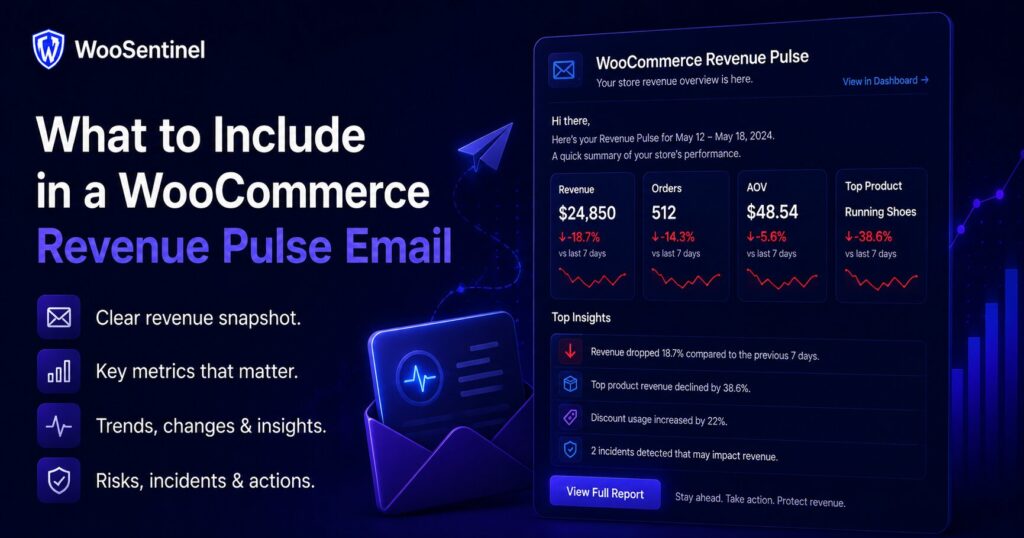
WooCommerce Revenue Pulse helps store teams review revenue movement, orders, AOV, product changes, incidents, and operational risk in a regular email workflow.
A Revenue Pulse email should do more than show sales numbers. It should help teams understand what changed, whether the change matters, and which signals may need review. For WooCommerce stores, this can include revenue movement, order volume, average order value, product decline, stock pressure, failed orders, and sync freshness.
This guide explains what to include in a WooCommerce Revenue Pulse email and how WooSentinel approaches the workflow carefully. It is written for store owners, agencies, and eCommerce teams evaluating WooCommerce revenue monitoring, Revenue Watch, sales reports, and alert-based operations without handing risky store changes to automation.
Why WooCommerce Revenue Pulse Emails Matter
WooCommerce teams need a consistent way to review store performance. Without a regular pulse, revenue drops, order declines, AOV changes, product issues, stock risk, failed orders, and sync problems may stay hidden inside separate dashboards.
A Revenue Pulse email creates a repeatable review habit. It helps the team see what changed, compare the current period with the previous period, and decide what needs attention. This is especially useful for agencies and teams that monitor more than one store.
The important distinction is that reporting is not the same as automatic repair. WooSentinel is designed to monitor, detect, explain, and prepare recommended checks. Risky WooCommerce actions such as changing product stock, editing orders, issuing refunds, changing payment settings, or changing checkout settings do not happen automatically.
Common WooCommerce Revenue Pulse Signals
A good Revenue Pulse workflow looks for patterns that affect revenue, order activity, product performance, and store health. Depending on the store and plan, these signals may include:
- revenue movement compared with the selected period
- orders_drop when order volume declines
- aov_drop when average order value changes
- top_product_drop when important product revenue declines
- low stock or stockout risk that may affect future sales
- failed orders or checkout-related issues
- sync freshness and store health context
- recommended checks and possible AI Action Queue follow-up
Practical example
If a store receives a Revenue Pulse email showing lower revenue, the team should not only look at the revenue number. They should check whether the issue came from fewer orders, lower AOV, top product decline, failed orders, stock pressure, checkout issues, or sync freshness.
In practice, the best response is usually a set of checks rather than a single assumption. Teams may review revenue movement, order count, AOV, top products, failed orders, low stock, store health, and recent campaign changes. A structured Revenue Pulse workflow reduces guesswork and makes it easier to decide what needs attention first.
How WooSentinel helps
WooSentinel connects WooCommerce monitoring with Revenue Pulse, Revenue Watch, incident detection, AI Copilot guidance, and AI Action Queue workflows. The product-led goal is simple: help teams see what changed, understand why it might matter, and review safe next steps from one operational layer.
WooSentinel can help teams use WooCommerce Revenue Pulse emails as part of a broader monitoring process.
- supports daily, weekly, and monthly revenue review workflows
- connects Revenue Pulse emails with Revenue Watch and incident detection
- helps teams review revenue drops, order drops, AOV changes, and product decline
- connects revenue movement with stock, failed orders, store health, and sync signals
- can prepare recommended checks through AI Action Queue for human review
- supports AI-enhanced explanations on eligible wallet-controlled plans
- keeps deterministic monitoring available without guaranteed recovery claims
Deterministic fallback and AI controls
WooSentinel keeps deterministic monitoring and rule-based insight available so teams are not dependent on OpenAI-enhanced analysis for every workflow. Where OpenAI-assisted features are available, they depend on plan permissions, wallet balance, and AI controls. This helps protect tenant spending and keeps advanced AI usage visible.
Human-reviewed action model
AI Action Queue is intentionally human-in-the-loop. AI can prepare summaries, recommended checks, and drafts, but users review actions before execution. Safe internal actions can be recorded after approval, while risky WooCommerce writes are not performed automatically.
Operational checklist for teams
When designing a WooCommerce Revenue Pulse email, start by deciding what the email should help the team understand. A useful pulse should show revenue movement, order movement, AOV changes, product-level signals, and any operational risk that deserves review.
Next, decide which signals should become incidents. A small daily movement may only need a report, while a larger revenue drop, order decline, failed order spike, low-stock issue, or sync problem may deserve structured follow-up.
Finally, define who receives the email. Store owners may need revenue, product, and stock visibility. Agencies may need client-level summaries. Larger teams may separate revenue review, inventory review, and technical troubleshooting. The value of Revenue Pulse increases when the right people receive the right signals consistently.
FAQ
What is a WooCommerce Revenue Pulse email?
It is a regular email that helps teams review revenue movement, orders, AOV, product changes, and operational risk in WooCommerce.
What should a Revenue Pulse email include?
It should include revenue movement, order count, AOV, product performance, low stock signals, failed orders, sync status, and recommended checks.
How is Revenue Pulse different from a basic sales report?
A basic sales report shows numbers. Revenue Pulse connects revenue movement with monitoring, incidents, store health, and recommended checks.
Can WooSentinel send Revenue Pulse insights?
WooSentinel supports Revenue Pulse workflows that help teams review daily, weekly, and monthly revenue movement with operational context.
Can AI explain Revenue Pulse changes?
Eligible plans can receive OpenAI-enhanced explanations when wallet balance and AI controls allow. Deterministic fallback remains available.
Start reviewing WooCommerce revenue with more context
WooSentinel helps teams monitor WooCommerce revenue movement, review Revenue Pulse insights, and understand what changed without sending checkout, login, or billing logic through the marketing site. Start Free Trial or compare the details on the pricing page.
For teams building a more reliable WooCommerce reporting process, the key is consistency. Review daily, weekly, and monthly signals, confirm notification settings, keep store connections healthy, and document which checks should happen before a customer-facing issue escalates.
Ready to detect WooCommerce issues before they affect revenue?
Use WooSentinel to monitor store health, detect incidents, and understand what to fix first.