
Best WooCommerce Store Monitoring Tools for 2026
Compare WooCommerce store monitoring tools for revenue, orders, stock, uptime, incidents, and store health. Learn how different monitoring approaches help detect operational risk before it affects revenue.
WooCommerce Monitoring | June 13, 2026
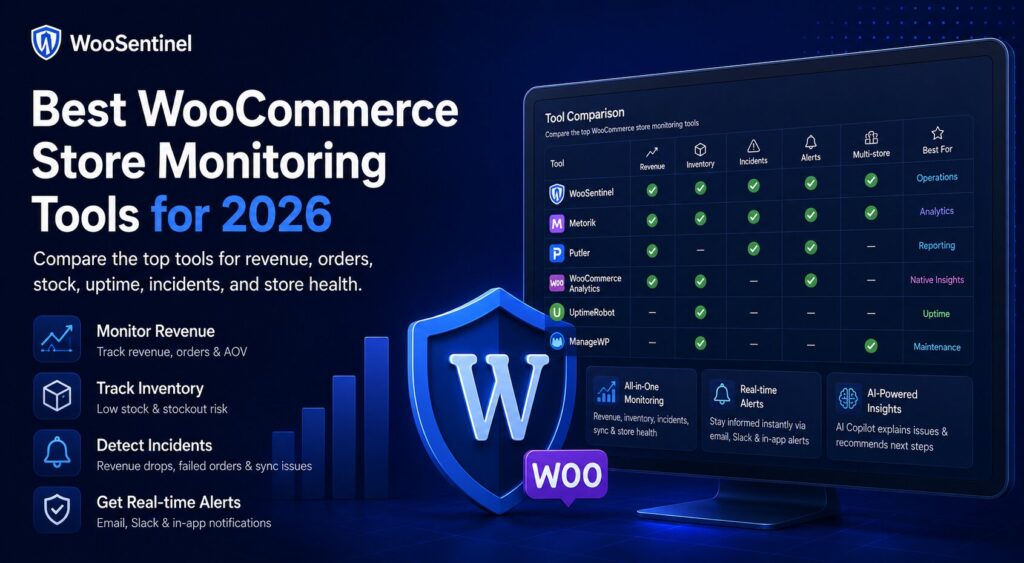
WooCommerce store monitoring tools help store owners, agencies, and eCommerce teams track store health, revenue movement, orders, stock, checkout issues, sync failures, and operational risk from one repeatable workflow.
A WooCommerce store can be technically online while still having serious business problems. Orders may stop coming in, revenue may drop, a top product may decline, low stock may create missed sales, or a sync failure may delay operational visibility. That is why store monitoring should go beyond basic uptime checks.
This guide compares the main types of WooCommerce store monitoring tools available in 2026, including analytics tools, reporting plugins, uptime monitors, WordPress management platforms, inventory alert plugins, and WooSentinel. The goal is not to say every store needs the same tool. The goal is to help teams choose the right monitoring layer for their risk, workflow, and growth stage.
What is a WooCommerce store monitoring tool?
A WooCommerce store monitoring tool helps teams track whether the store is operating normally. Depending on the tool, this may include revenue, orders, product performance, inventory, checkout, payment failures, API sync, uptime, security, backups, or scheduled reports.
The important distinction is that WooCommerce monitoring is not only analytics. Analytics tells you what happened. Monitoring should help you notice when something needs attention.
For example, a traditional report may show that revenue dropped yesterday. A monitoring workflow should help surface the drop earlier, explain what changed, prioritize the issue, and guide the team toward practical checks.
Why WooCommerce stores need monitoring beyond analytics
WooCommerce already gives store owners access to useful reports and order data. Many analytics tools also provide deeper reporting, product insights, customer analysis, and email summaries. These are valuable, but they are usually not the same as operational incident monitoring.
A store owner may not need another chart. They may need to know:
- Did revenue drop compared with the previous period?
- Did order volume suddenly decline?
- Did average order value change?
- Did a top product stop selling?
- Are important products running low on stock?
- Are failed orders increasing?
- Is checkout still working normally?
- Did a sync job fail or become stale?
- Which issue should the team review first?
This is where WooCommerce store monitoring becomes different from normal reporting. The goal is not only to collect data. The goal is to turn important changes into a review process.
Main types of WooCommerce store monitoring tools
1. Native WooCommerce Analytics
WooCommerce Analytics is the built-in reporting layer available inside WooCommerce. It helps teams review sales, revenue, orders, customers, products, coupons, taxes, and other store data.
This is a good starting point for many stores because it is already part of the WooCommerce admin experience. Store owners can use it to review performance, compare periods, and export data when needed.
However, native analytics is mostly a reporting layer. It may not be enough when a team wants proactive alerts, incident workflows, revenue-risk context, or AI-assisted investigation.
Best for:
- basic sales and order reporting
- store owners who want native WooCommerce data
- manual review of store performance
- teams that do not need advanced incident workflows yet
2. WooCommerce analytics and reporting tools
Tools such as Metorik and Putler are commonly used by WooCommerce teams that want stronger analytics, dashboards, customer insights, product reports, subscriptions reporting, and business intelligence.
These tools are useful when the main need is understanding store performance in detail. They can help teams analyze sales, products, customers, segments, profit, subscriptions, and other business metrics.
They are especially useful for stores that want better reporting than the native WooCommerce admin provides.
Best for:
- advanced WooCommerce analytics
- customer and product reporting
- sales dashboards
- subscription or customer analysis
- business intelligence workflows
Limitations to consider:
- analytics is not always the same as incident detection
- teams may still need separate operational alerts
- reports may show problems after they already happened
- action workflows may need to be handled outside the tool
3. WooCommerce sales report email tools
Sales report email tools send scheduled summaries to the store owner or team. These reports may be daily, weekly, or monthly and can include revenue, order count, top products, payment methods, and other store metrics.
These tools are useful because they reduce the need to manually log in just to check performance. For smaller teams, a simple daily sales report can be enough to stay informed.
Best for:
- daily sales visibility
- weekly or monthly revenue summaries
- store owners who prefer email reports
- simple reporting workflows
Limitations to consider:
- a scheduled report is not always an alert
- reports may not explain why something changed
- they may not create incident workflows
- teams may still need separate monitoring for stock, sync, checkout, and failed orders
4. WordPress uptime and site monitoring tools
Uptime monitoring tools check whether a website is reachable. Some tools can alert teams when a site is down, slow, or returning an error. This is important for any WooCommerce store because downtime can directly affect sales.
However, uptime does not tell the whole story. A WooCommerce store may be online but still not selling because of a checkout issue, payment problem, low stock, failed orders, broken sync, or operational incident.
Best for:
- downtime alerts
- HTTP status monitoring
- basic availability checks
- technical teams monitoring site availability
Limitations to consider:
- uptime does not confirm that checkout is healthy
- uptime does not detect revenue drops
- uptime does not explain product or order issues
- uptime does not provide WooCommerce-specific operational context
5. WordPress management and maintenance tools
Tools such as ManageWP, MainWP, WP Umbrella, and similar platforms help agencies and site managers manage multiple WordPress websites. They often focus on updates, backups, uptime, security, maintenance reports, and multi-site management.
These platforms are useful for WordPress maintenance businesses and agencies managing many client websites. They help reduce admin workload and keep sites maintained.
Best for:
- WordPress maintenance workflows
- plugin and theme updates
- backup monitoring
- uptime and security checks
- agency site management
Limitations to consider:
- they may not be focused on WooCommerce revenue movement
- they may not detect WooCommerce-specific incidents
- they may not connect stock, orders, revenue, and checkout risk
- they may not provide AI-assisted operational investigation
6. Inventory and low stock alert plugins
Low stock and inventory alert plugins help teams know when products are running low or out of stock. This is valuable because stock issues can quickly turn into lost sales.
For stores with fast-moving products, stock monitoring is not optional. A product may still be popular, but if stock falls too low, the store may lose sales before the team notices.
Best for:
- low stock alerts
- out-of-stock visibility
- inventory threshold monitoring
- restock workflows
Limitations to consider:
- stock alerts may not include revenue impact
- they may not prioritize products by risk
- they may not connect stock issues to broader incidents
- they may not help teams investigate revenue movement
7. WooSentinel for WooCommerce operational monitoring
WooSentinel is designed for WooCommerce teams that need more than static reports. It focuses on monitoring store health, detecting incidents, tracking revenue movement, identifying operational risk, and preparing safe next steps for human review.
WooSentinel combines WooCommerce monitoring with Revenue Watch, incident detection, AI Copilot guidance, wallet-controlled AI usage, and AI Action Queue workflows.
Best for:
- WooCommerce revenue monitoring
- store health monitoring
- revenue drop and order drop detection
- low stock and stockout-risk review
- sync failure visibility
- incident-based workflows
- AI-assisted explanations with human review
- agencies and teams managing multiple stores
WooSentinel does not aim to replace every analytics, uptime, or WordPress maintenance tool. Instead, it adds a WooCommerce-specific operational layer for teams that want to detect issues and review safe actions before small problems become lost sales.
How to choose the right WooCommerce store monitoring tool
The best tool depends on what problem the team is trying to solve.
If the store only needs better charts, analytics tools may be enough. If the team wants daily sales summaries, a sales report email plugin may be enough. If the main concern is downtime, an uptime monitoring tool is important. If the team manages many WordPress sites, a WordPress maintenance platform may be the right foundation.
But if the team wants to monitor WooCommerce operations, detect revenue movement, create incidents, review stock risks, track sync failures, and use AI carefully, then a WooCommerce-specific monitoring platform is more appropriate.
Practical comparison checklist
When evaluating a WooCommerce store monitoring tool, ask these questions:
- Does it monitor revenue movement, or only show reports?
- Can it detect order drops and no-order periods?
- Can it surface low stock and stockout risk?
- Does it help identify failed orders or checkout issues?
- Does it detect sync failures or stale store data?
- Can it create incidents instead of only showing charts?
- Does it support agencies or multi-store workflows?
- Does it provide email alerts or summaries?
- Does it explain why an issue might matter?
- Does it keep risky actions under human review?
A good monitoring workflow should make daily review easier, not more complicated.
How WooSentinel helps
WooSentinel connects WooCommerce monitoring with incident detection, Revenue Watch, AI Copilot guidance, and AI Action Queue workflows. The product-led goal is simple: help teams see what changed, understand why it might matter, and review safe next steps from one operational layer.
WooSentinel helps teams:
- monitor WooCommerce store health from a dedicated dashboard
- detect revenue drops, order drops, AOV changes, and product decline
- track low stock and stockout-risk signals
- surface sync failures and stale operational data
- turn important changes into incidents
- review AI-assisted explanations on eligible wallet-controlled plans
- prepare AI Action Queue follow-up for human approval
- avoid risky automatic WooCommerce changes
Deterministic fallback and AI controls
WooSentinel keeps deterministic monitoring and rule-based insight available so teams are not dependent on OpenAI-enhanced analysis for every workflow. Where OpenAI-assisted features are available, they depend on plan permissions, wallet balance, and AI controls. This helps protect tenant spending and keeps advanced AI usage visible.
Human-reviewed action model
AI Action Queue is intentionally human-in-the-loop. AI can prepare summaries, recommended checks, and drafts, but users review actions before execution. Safe internal actions can be recorded after approval, while risky WooCommerce writes are not performed automatically.
Operational checklist for teams
Start by deciding what you need to monitor daily. For most WooCommerce teams, the baseline should include orders, revenue, stock, failed orders, checkout health, sync status, and store health signals.
Next, define what deserves an alert. A small movement may only need a report. A larger revenue drop, no-order period, failed order spike, or urgent low-stock issue may need an incident.
Finally, decide who owns the response. Store owners may review stock and campaigns directly. Agencies may assign checks by client store. Larger teams may separate revenue review from technical troubleshooting. Monitoring works best when alerts become clear ownership.
Related Resources
Continue Exploring WooCommerce Monitoring
Learn more about WooCommerce monitoring, incident detection,
revenue protection, AI Action Queue, Revenue Watch, pricing,
security, and operational workflows.
WooCommerce Monitoring Platform
Learn how WooSentinel helps monitor store health, detect
operational incidents, protect revenue, and prepare
AI-assisted actions for review.
WooCommerce Monitoring Features
Explore Revenue Watch, AI Action Queue, AI Copilot,
incident detection, store health monitoring,
and revenue protection tools.
WooCommerce Monitoring Pricing
Compare plans, AI access, wallet controls,
store limits, and support options for
WooCommerce monitoring.
WooCommerce Monitoring Use Cases
See how WooSentinel helps store owners,
agencies, multi-store operators, and
enterprise WooCommerce teams.
WooCommerce Monitoring Security
Learn about store access, AI controls,
Revenue Watch boundaries, billing transparency,
and operational trust.
WooCommerce Monitoring FAQ
Find answers about Revenue Watch,
AI Action Queue, AI billing, plans,
incidents, and WooCommerce monitoring.
FAQ
What is the best WooCommerce store monitoring tool?
The best tool depends on the problem you need to solve. Analytics tools are useful for reports, uptime tools check availability, and WooCommerce-specific monitoring tools help detect store health and revenue incidents.
Is WooCommerce Analytics enough for store monitoring?
WooCommerce Analytics is useful for reporting, but teams may need additional monitoring when they want alerts, incidents, revenue-risk context, stock signals, sync checks, or AI-assisted review.
Is uptime monitoring enough for WooCommerce?
No. Uptime monitoring can confirm that a site is reachable, but it does not always confirm that checkout, payments, orders, stock, and revenue are healthy.
What should agencies monitor across WooCommerce stores?
Agencies should monitor revenue movement, orders, stock, checkout issues, sync failures, failed orders, store health, and client-specific incidents.
Can AI help with WooCommerce store monitoring?
Yes. AI can help summarize incidents, explain possible causes, and prepare recommended checks. In WooSentinel, AI-assisted workflows remain controlled by plan permissions, wallet balance, and human review.
Start monitoring WooCommerce operations with more context
WooSentinel helps teams monitor WooCommerce operations, detect revenue movement, and review AI-prepared actions without sending checkout, login, or billing logic through the marketing site. Start Free Trial or compare the details on the pricing page.
For teams building a more reliable WooCommerce operations process, the key is consistency. Review incidents daily, confirm notification settings, keep store connections healthy, and document which checks should happen before a customer-facing issue escalates. WooSentinel is built to support that discipline with monitoring, recommended checks, internal links between workflows, and clear controls around OpenAI-enhanced features.
Ready to detect WooCommerce issues before they affect revenue?
Use WooSentinel to monitor store health, detect incidents, and understand what to fix first.